Sigma-Based PCA Clusters
Create PCA clusters from sigma bands and compare only clusters that contain points.
What's included
Create clusters from sigma bands
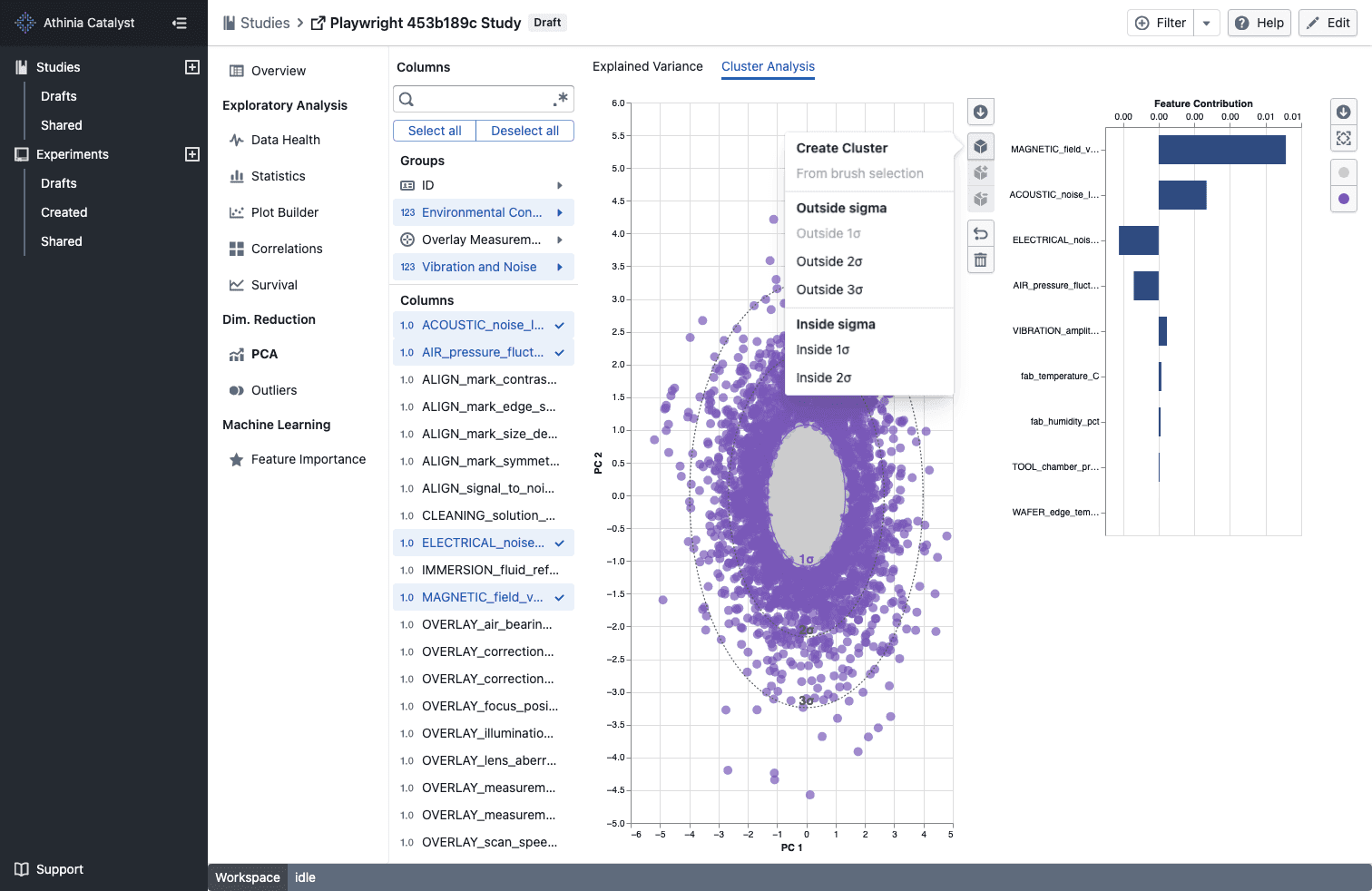
- Open the cluster menu in PCA -> Cluster Analysis to create ready-made Inside nσ and Outside nσ clusters without drawing a brush
- Sigma-based clusters automatically assign matching points as soon as the PCA view finishes loading
- The matching sigma contour adopts the cluster color so you can see the selected boundary at a glance
Compare populated clusters only
- Cluster comparison menus now show only clusters that currently contain points
- If a selected cluster becomes empty or is removed, the comparison updates to the next valid populated cluster automatically
Notes
- Sigma-based clusters are stored with your other PCA cluster selections for that study
- Outside nσ options are available for every displayed sigma band, while Inside nσ options are available for the inner bands
- Empty clusters are excluded from comparison choices until they contain points