Trials and Campaigns
Note about BayBE
Catalyst uses BayBE under the hood. BayBE may evolve over time. This page explains parameters in non-technical terms as they are used in Catalyst today. For the detailed technical reference that Catalyst is aligned with, see the BayBE 0.15.0
A trial is one candidate set of parameter values for your process. It can move from a recommendation awaiting review to an accepted run and, finally, a completed trial with measured target results. BayBE learns from completed measurements to recommend what to try next.
Where you manage trials
The Create Experiment wizard defines the campaign: its targets, parameters, and constraints. It does not create trial results.
After creating the experiment, open its Trials page to review and manage its trials:
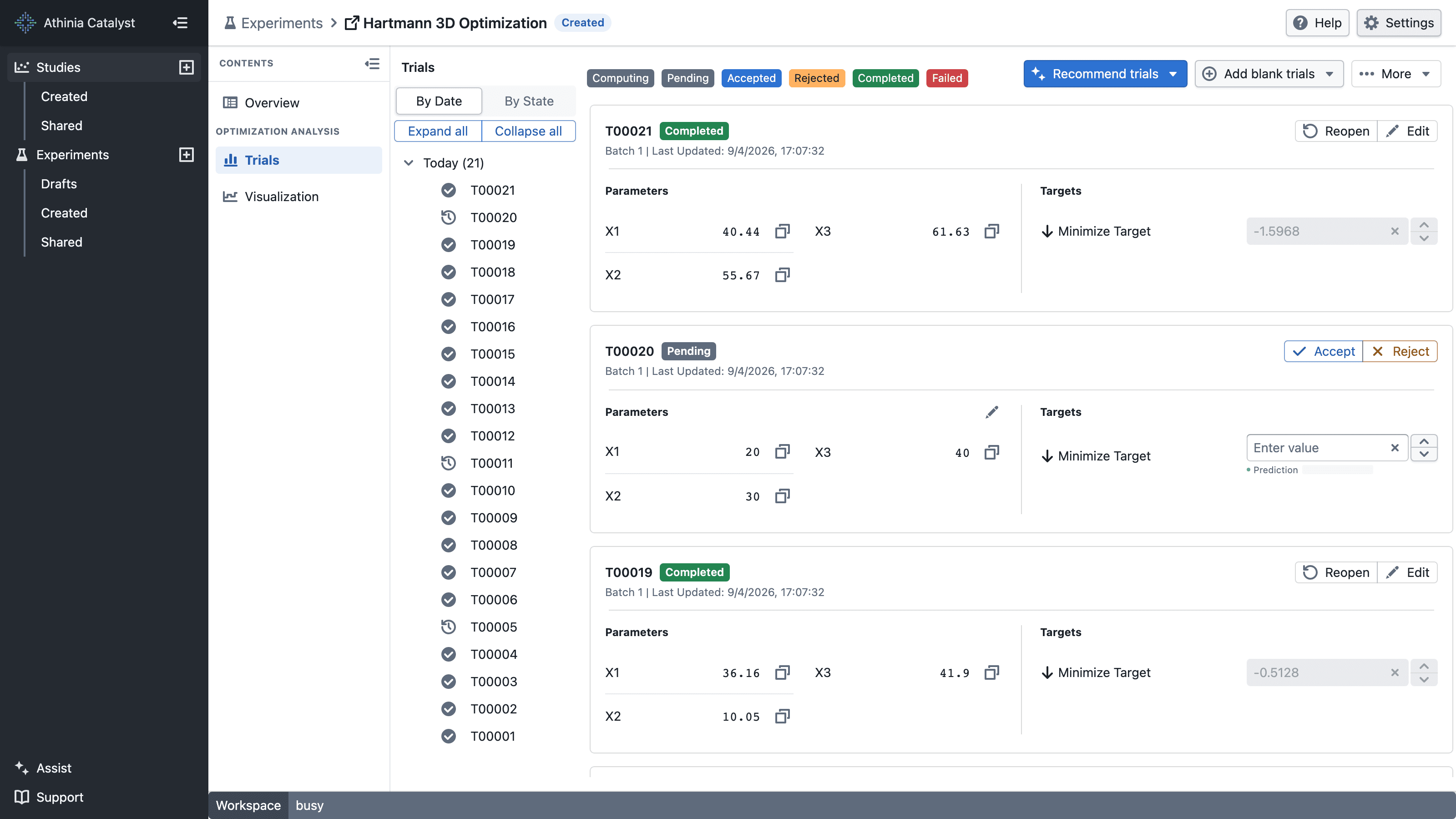
Use the toolbar to:
- Recommend trials — ask BayBE to propose optimized parameter combinations.
- Add blank trials — create trials whose parameter values you will enter manually.
- More — import, export, or sync trial data.

To import existing trial data in bulk, open More → Import trials. See Uploading Trials via CSV for the complete workflow.
What is a trial?
A trial contains:
- Parameter values used (inputs)
- Target measurements observed (outputs)
Think of each trial as one row in your experiment dataset.
Everyday analogy:
- For baking: one cake you bake with a specific oven temperature, baking time, and sugar type, then score for taste and texture.
In Catalyst, trials are created with Recommend trials, Add blank trials, or More → Import trials.
How recommendations improve over time
As you add trials, BayBE updates what it has learned and recommends settings that balance:
- Exploration – learn in areas with little data
- Exploitation – refine around the best observed results
Use Recommend trials to request parameter combinations from BayBE. Use Add blank trials to enter your own parameter combinations, or open More → Import trials to upload them from CSV.
Every new completed trial makes the next recommendation a bit smarter, as BayBE incorporates the new data.
Predictions for open trials
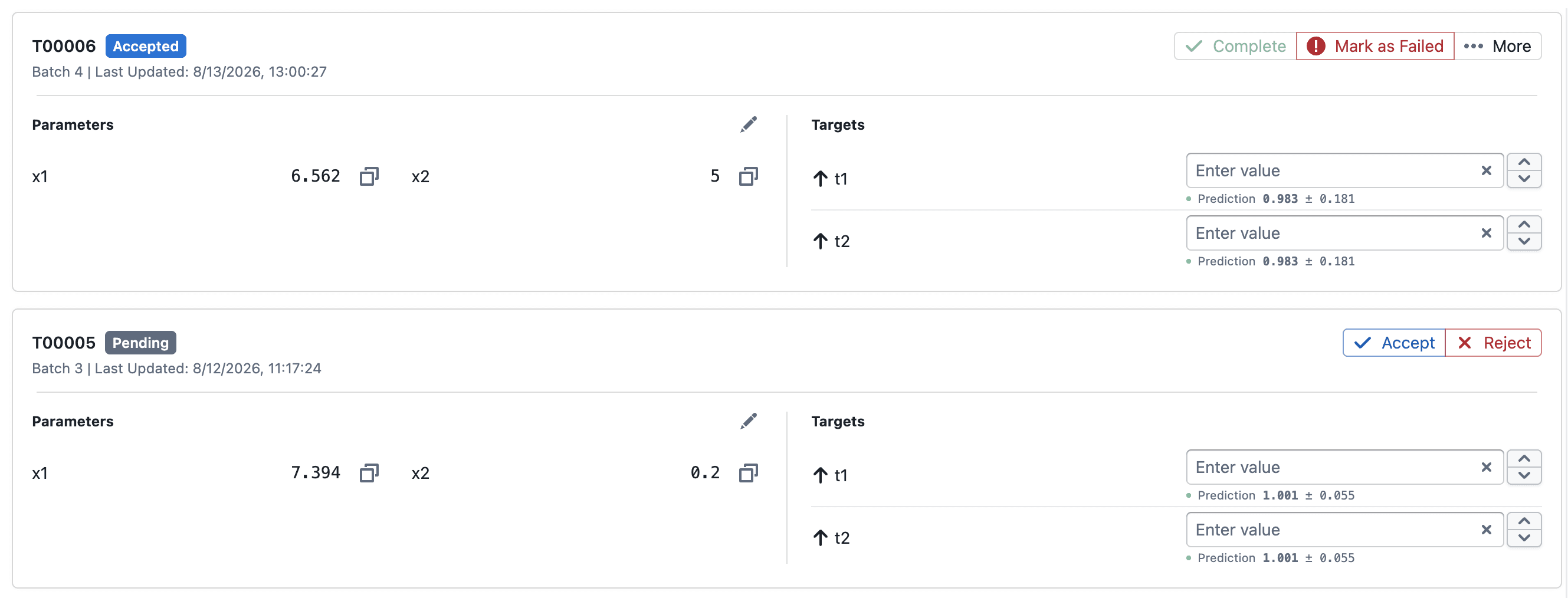
For Pending and Accepted trials, Catalyst shows a prediction below each target as mean ± std:
- Mean is BayBE's predicted target value for the trial's parameter settings.
- Std is the posterior standard deviation, which indicates the model's uncertainty around that prediction. A larger value means greater uncertainty.
The prediction updates as completed trial results are added. It is a model estimate, not a measured result, and ± std is not the observed minimum and maximum.
Export and sync trial data
Open More on the Trials page to export trials to your computer or sync them to the experiment's linked Foundry dataset.
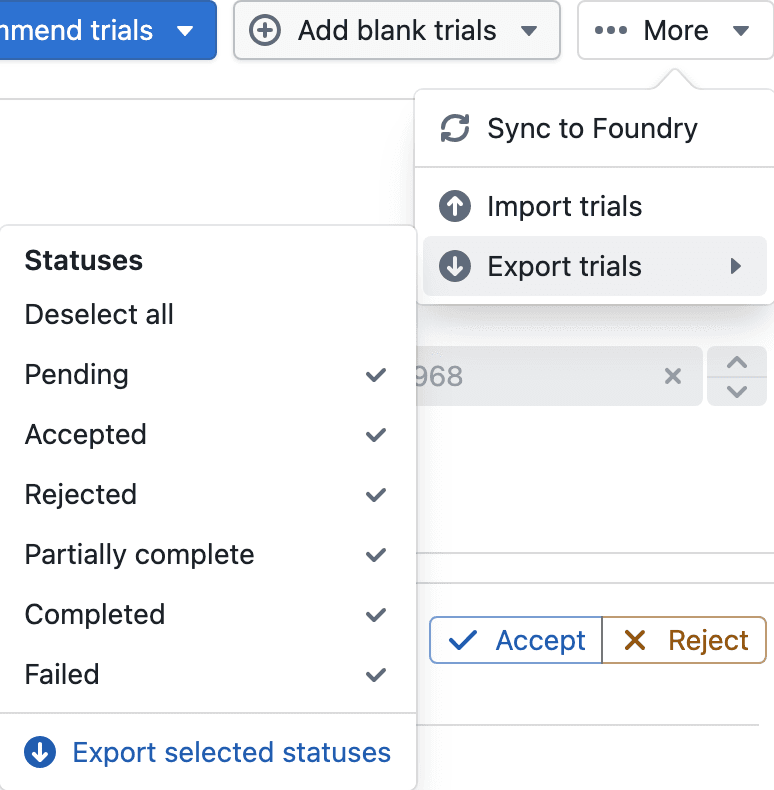
Export trials as CSV
- Open More → Export trials.
- Select the statuses to include. All available statuses are selected by default; use Select all or Deselect all to change the selection quickly.
- Select Export selected statuses.
The downloaded <experiment-name>_trial.csv contains parameter values, target values, Trial ID, State, State Message, and Trial Index. Pending, Accepted, Rejected, partially complete, Completed, and Failed trials can be exported. Running trials are not included.
The exported CSV can be edited and imported again. Keep Trial ID when updating existing trials, or clear it to create new trials. See Uploading Trials via CSV for column and validation details.
Sync trials to Foundry
Select More → Sync to Foundry to write trials with complete parameter values to the experiment's linked Foundry dataset as trials.parquet. The synced table contains the experiment's parameter columns, target columns, and trial state. Parameter and target names are converted to Foundry-safe column names.
Sync uses the workspace and may take a moment. When it completes, Catalyst reports how many trials were written. Refresh the dataset preview to see the latest data.
Use Export trials when you need a local CSV or want to choose statuses. Use Sync to Foundry when downstream Foundry workflows need the current trial data.
Data quality tips
Good trials data makes BayBE more effective:
- Record "bad" results too – BayBE learns from failures as well as successes.
- Keep units and naming consistent across trials (e.g., always use the same unit for temperature and time).
- Avoid changing the meaning of a parameter or target mid-experiment; if definitions change, consider starting a new experiment.
- If you run replicates, be consistent in how you store them (separate trials vs averaged result).
In the UI this usually means:
- Using consistent column names and units when uploading batches.
- Being careful when editing experiment configuration after trials already exist.
The algorithm works most efficiently when all suggested trials are completed before requesting a new set.
Only request the number of trials you actually intend to run.
You may also see recommendations that seem unintuitive or repeat combinations you already know perform poorly. These “bad” results are still valuable — they help the algorithm learn faster and converge more quickly toward the optimum. (Trust the process.)
Trial statuses
Only measured target values from Completed trials train the model. Other statuses record where a trial is in the workflow and prevent the same parameter combination from being treated as new work.
| Status | Meaning | Next action |
|---|---|---|
| Computing | BayBE is generating trial recommendations. | Wait for generation to finish, or abort it. |
| Pending | A proposed or imported trial is waiting for review. | Accept or reject it. |
| Accepted | The trial is approved to run, but results are not stored. | Enter its target measurements and complete it, or mark it failed/rejected. |
| Completed | The trial has at least one measured target value. | Use it for analysis and future recommendations, or reopen it when required. |
| Rejected | The trial was intentionally not run. | Reopen it if you want to reconsider it. |
| Failed | The trial could not be completed. | Reopen and retry it when appropriate. |
Rejected and Failed trials are not model measurements. Catalyst retains their parameter combinations as already considered, helping prevent exact duplicate recommendations.
A Completed trial can be partially complete when only some targets were measured. The available measurements can still be used in target-specific analysis, while calculations that depend on every target—such as desirability—require all target values.
FAQ
Worker subprocess was killed, likely due to running out of memory
This message appears on a Failed trial when the workspace worker ran out of memory while processing the trial (for example, while generating BayBE recommendations for a large search space or a big batch). When a process exceeds the memory allocated to the workspace, the operating system terminates it, and Catalyst records this as a failed trial.
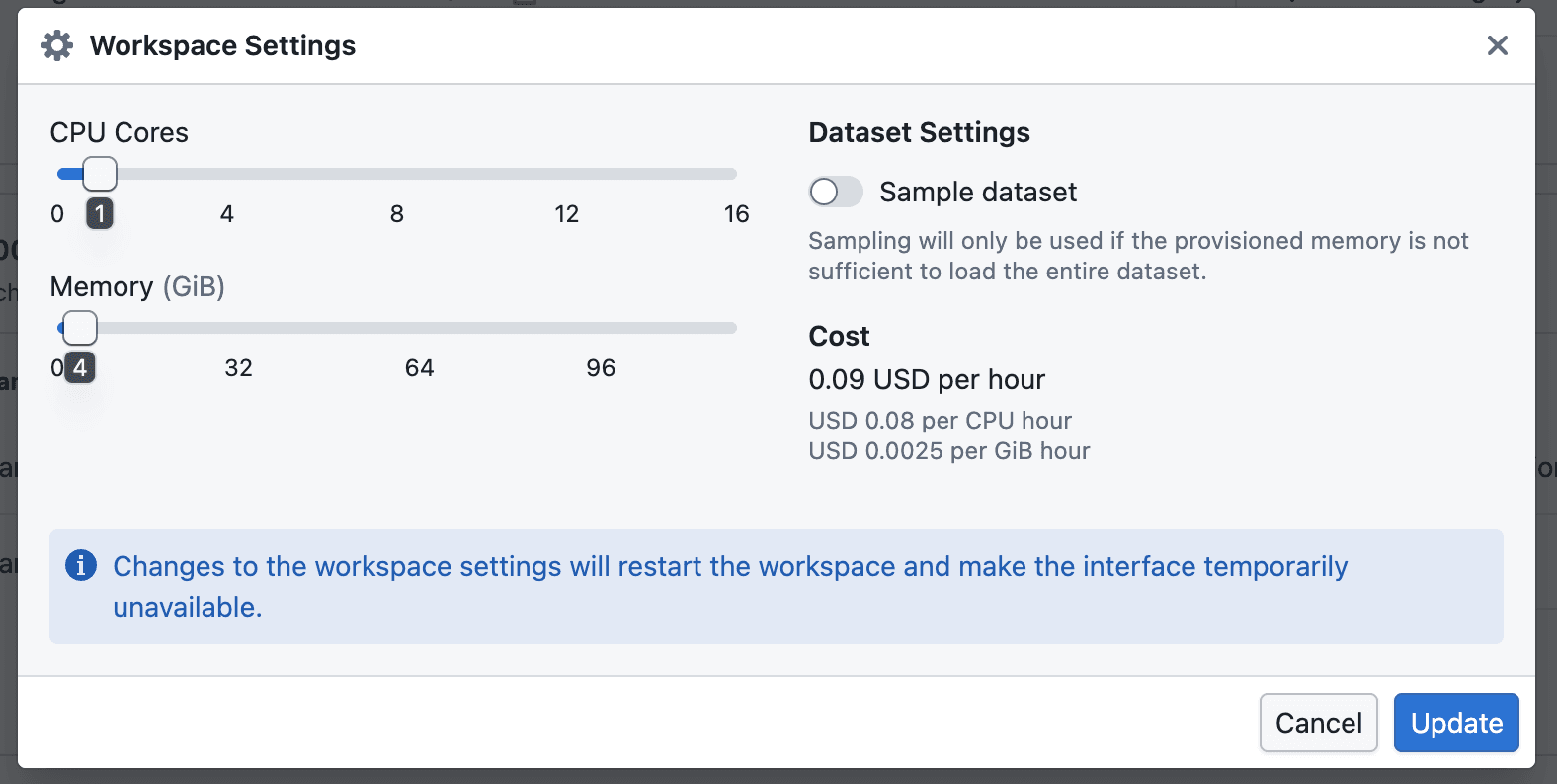
To resolve it, increase the memory allocated to your workspace:
- Expand the Workspace bar at the bottom of the page, then select the cog icon to open Workspace Settings.
- Increase the Memory (GiB) slider. If needed, raise CPU Cores as well — the available memory range scales with the number of cores.
- Select Update. Changing workspace settings restarts the workspace, so the interface is briefly unavailable.
- Once the workspace is back up, reopen the trial and try again.

If you routinely hit this limit, consider reducing the number of trials requested per batch, or simplifying the search space (fewer parameters or discrete levels), which lowers the peak memory the worker needs.
Further reading (BayBE)
For users or data scientists who want the full technical reference:
- BayBE Campaigns: https://emdgroup.github.io/baybe/0.15.0/components/campaigns.html
- BayBE Getting Recommendations: https://emdgroup.github.io/baybe/0.15.0/concepts/getting_recommendations.html