Parameters
Note about BayBE
Catalyst uses BayBE under the hood. BayBE may evolve over time. This page explains parameters in non-technical terms as they are used in Catalyst today. For the detailed technical reference that Catalyst is aligned with, see the BayBE 0.15.0
Experiments in Catalyst use parameters to describe the knobs you can turn in each trial. This page explains what parameters are, which type to pick, and how to fill them in — no technical background needed.
What is a parameter?
A parameter is any setting you can control when running a trial. Think of it as one of the dials you adjust before each experiment run.
Examples:
- Oven temperature
- Baking time
- Which solvent to use
- Which chemical additive to include
Each combination of parameter settings makes up one trial. The system learns from the results of past trials to suggest better settings for the next one.
Where you configure parameters in Catalyst
In the Create Experiment wizard, parameters are set up in the Parameters step.
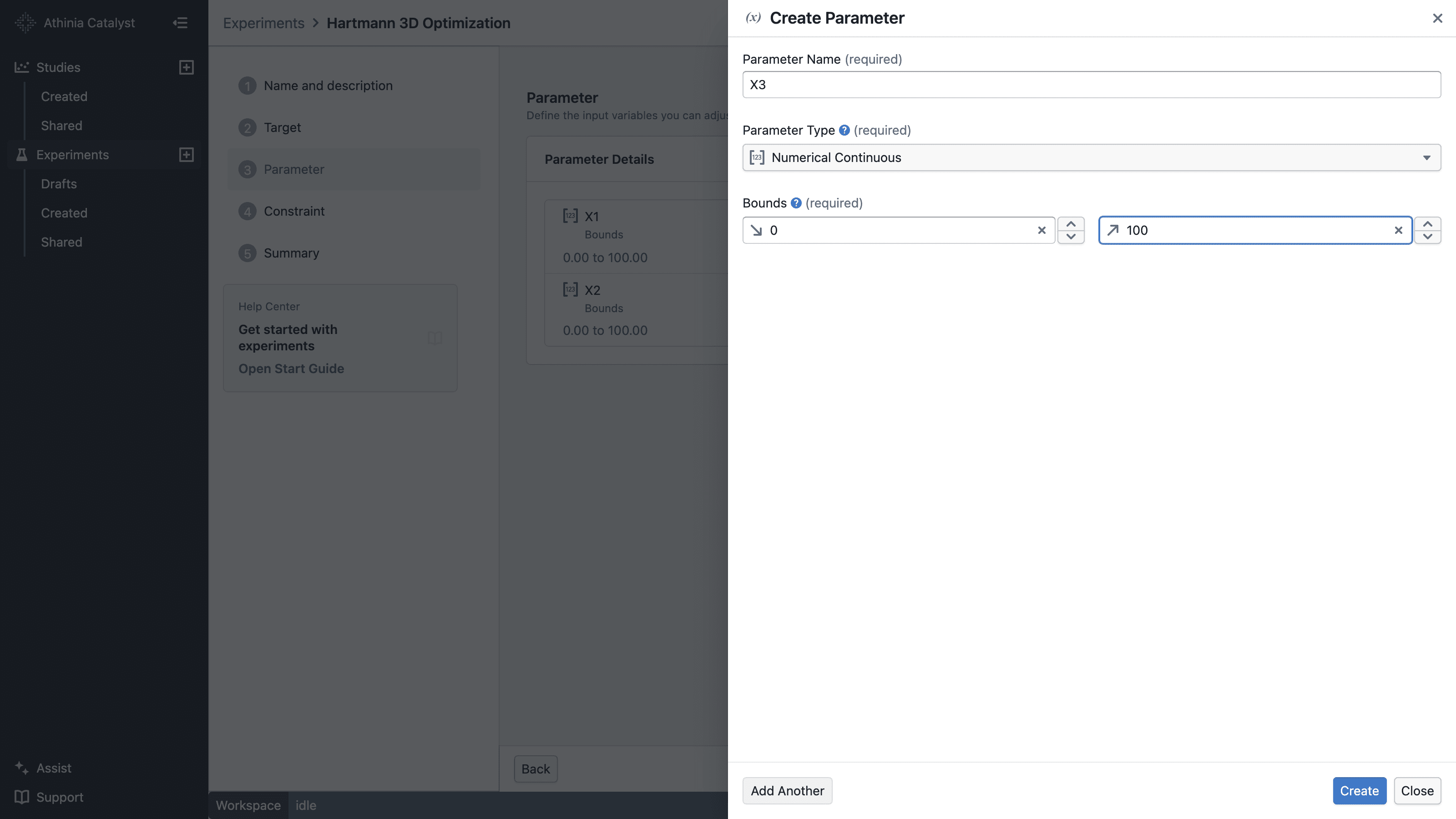
Select Add Parameter to open the parameter drawer. Enter a name, choose the parameter type, and provide the required range or values. Select Create to save it, or Create and add another when defining several parameters.
Saved parameters appear in the Parameters step, where you can review them before continuing.
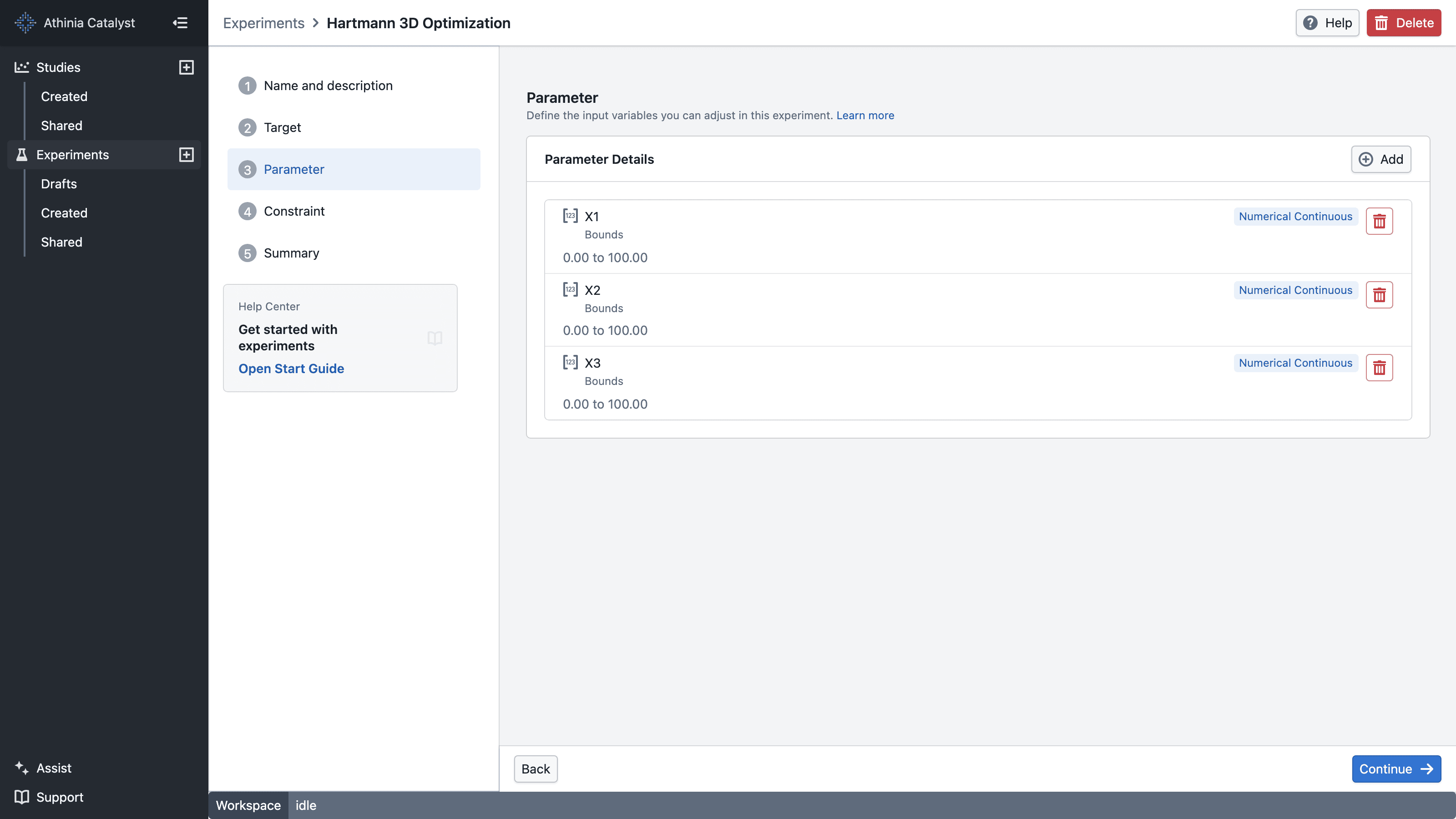
In this step you:
- Add one or more parameters
- Choose a type for each one
- Fill in the range or list of options
The wizard will not let you continue if:
- No parameters have been added
- Any parameter is missing required information (e.g. no range, or an empty options list)
Choosing a parameter type
There are five types. Pick the one that matches the nature of what you are controlling:
| Type | Use when... | Example |
|---|---|---|
| Numerical Continuous | Any value in a range is valid | Temperature: anywhere from 60 to 90 °C |
| Numerical Discrete | Only specific numbers are valid | Baking time: 20, 25, or 30 minutes exactly |
| Categorical | Options are named choices, not numbers | Solvent: Solvent A, Solvent B, or Solvent C |
| Substance | Options are actual chemical compounds | Ligand: a list of molecules identified by structure |
| Custom Discrete | Options are items described by your own numeric measurements | Polymer grade described by glass-transition temperature and molecular weight |
Substance vs. Categorical — which one?
- Use Categorical when your options are just names or labels (vendor names, method names, material grades).
- Use Substance when your options are real chemical compounds. The system can then use each compound's molecular structure to make smarter recommendations.
Numerical Continuous
A continuous parameter covers any value within a range you set. You give the system a minimum and a maximum, and it can suggest any number in between.
Think of it like a sliding scale — the system can move the slider to any position between the two ends.
What you fill in
| Field | What it means |
|---|---|
| Min | The lowest value that may be suggested |
| Max | The highest value that may be suggested |
Rules:
- Min must be strictly lower than Max
- Both values must be real, finite numbers
When to use this: When your setting can realistically be any value within a range — temperature, concentration, flow rate, pH. If there is no reason to restrict the system to a handful of specific numbers, this is usually the right choice.
Example: Oven temperature anywhere between 150 °C and 200 °C.
If your equipment can be set to any value in the range (not just specific steps), use Continuous — it gives the system more room to find the best setting.
Numerical Discrete
A discrete parameter covers a fixed set of numbers you define. The system will only ever suggest one of those exact values — nothing in between.
Think of it like a dial with fixed notches — the system can only land on one of the positions you set.
What you fill in
| Field | What it means |
|---|---|
| Values | The specific numbers the system may recommend |
Values can be evenly spaced (e.g. 10, 20, 30, 40) or unevenly spaced (e.g. 0.1, 1.0, 5.0, 50.0). You need at least two values.
Rules:
- At least 2 values required
- No duplicate values
When to use this: When your equipment or protocol only works at specific settings — a machine that runs at 200, 400, or 800 rpm but nothing in between, or a timer that only accepts whole minutes.
Example: Stirring speed at exactly 200, 400, 600, or 800 rpm.
Categorical
A categorical parameter covers a list of named options. The options are labels (words), not numbers. The system picks one from the list you provide.
Think of it like a dropdown menu — the system chooses one item from the list.
What you fill in
| Field | What it means |
|---|---|
| Values | The full list of options the system knows about |
| Active Values | The options the system may recommend right now (optional) |
| Encoding | How the system converts your labels into numbers internally |
Rules:
- At least 2 values required
- Active values (if set) must be chosen from your values list
When to use this: When your options are names or labels with no natural numerical order — vendor names, method names, process modes, or solvent names when molecular structure does not matter.
Example: Solvent type — choosing between Solvent A, Solvent B, or Solvent C.
Active Values
Active values let you limit what gets recommended without losing historical data. All values in your list are still recognised — past results that used any of them still inform the system. But only the active ones will be suggested for new trials.
Example: You have four solvents listed but are currently out of stock on two. Mark only the two available ones as active — the system learns from all past data but only recommends what you can actually use today.
Encoding
Encoding is how the system converts your text labels into numbers so it can learn from them. You do not need to understand the maths — just pick the option that fits your situation.
One-Hot — Treats each option as completely independent, with no assumed relationship between them. This is the safe default for most cases.
Example: Solvent A, Solvent B, Solvent C — there is no reason to think one is "closer" to another, so treat them as fully separate.
Integer — Assigns each option a number in order (1, 2, 3...). Only use this when your options have a genuine low-to-high order.
Example: Intensity — Low, Medium, High. These have a natural order, so numbering them makes sense.
When in doubt, use One-Hot. Only switch to Integer if your options genuinely represent a progression from least to most of something.
Substance
A substance parameter is like a categorical parameter, but each option is a real chemical compound. Instead of treating options as plain labels, the system uses each compound's molecular structure to understand how similar or different the options are. This helps it make smarter recommendations when the choice involves chemistry.
Think of it like a categorical dropdown — but where the system also knows the "shape" of each option and can use that to guide its suggestions.
What you fill in
| Field | What it means |
|---|---|
| Substances | A list of compounds, each with a name and a SMILES string |
| Active Values | The compounds the system may recommend right now (optional) |
| Encoding | How the system describes each compound's molecular structure |
| Decorrelate | Whether to remove redundant descriptions to keep things efficient |
Rules:
- At least 2 substances required
- Each substance needs a valid SMILES string
What is a SMILES string?
A SMILES string is a standard text shorthand for a molecule's structure — a way chemists write down a compound so software can understand it. For example, water is O and ethanol is CCO. Your chemistry team or compound library should be able to provide these.
When to use this: When your options are actual chemical compounds — solvents, ligands, additives, catalysts — and you want the system to use molecular similarity to guide its recommendations.
Example: Choosing a ligand from a library of 10 candidate molecules, each defined by its chemical structure.
The way the system describes substances works best for small molecules (the kind you would find in a typical reaction or formulation screen). It is not suitable for large molecules like polymers, or for mixtures. If you are working with those, use a Custom Discrete parameter instead.
Active Values
Works the same way as in Categorical — mark a subset of your substances as active to limit what gets recommended, while still keeping all historical data in play.
Example: You have 10 ligands listed but only 4 are available in the lab right now. Set those 4 as active — the system still learns from past experiments with all 10 but only recommends the ones you can actually run.
Encoding
Encoding is how the system converts each compound's molecular structure into numbers it can learn from. This happens automatically using the SMILES string you provide — you do not need to do anything manually.
The main options are:
MORDRED — Uses a broad set of chemical properties to describe each molecule. More detailed, but can be slower.
RDKIT 2D Descriptors — Uses a standard set of structural measurements.
RDKIT Fingerprint — Describes each molecule based on the patterns in its chemical structure.
Leave it as the default. The difference between encodings rarely matters for most experiments. Only revisit this if you have a specific reason to.
Decorrelate
When the system describes a compound, it generates hundreds of numbers representing different molecular properties. Many of those numbers are redundant — they are saying the same thing in different ways, which can slow things down and make the system less reliable.
Decorrelate automatically removes the redundant ones. You set it as a number between 0 and 1 — the lower the number, the more aggressively redundant descriptions are removed.
Example: A setting of 0.7 means: if any two descriptions are more than 70% similar to each other, drop one. This typically reduces hundreds of numbers down to 10–50 useful ones.
Leave this on. Turning it off is rarely helpful — keeping it on almost always makes the system learn faster and more reliably.
Custom Discrete
A custom discrete parameter works like a categorical parameter, but each option comes with its own set of numeric measurements that you provide. Instead of using molecular structure (like Substance does), you supply a table of numbers that describe each option in whatever way makes sense for your domain.
Think of it like a spreadsheet — each row is one option, each column is a numeric property you have measured for it. The system uses those numbers to understand how similar or different the options are, and guides its recommendations accordingly.
Example: You are screening a set of polymer grades. You know each polymer's glass-transition temperature and molecular weight from lab measurements. You enter that data as a table — one row per polymer, one column per measurement — and the system uses it to suggest which polymer to try next.
What you fill in
Each option (row) has a Name and one value per descriptor column.
| Field | What it means |
|---|---|
| Name | A unique label for each option (e.g. Polymer A) |
| Descriptor columns | Numeric measurements that describe each option |
| Active Values | The options the system may recommend right now (optional) |
| Decorrelate | Whether to remove redundant descriptors automatically |
You can enter data by typing directly into the table, or by uploading a CSV file where the first column is the name and every other column is a descriptor.
Rules:
- At least 2 options required
- All option names must be unique and non-empty
- At least 1 descriptor column required
- All descriptor column names must be unique and non-empty
- All descriptor cell values must be numeric — strings are not accepted
When to use this: When your options are not chemical compounds (so Substance does not apply), but you have measured numeric properties for each one. Common cases include polymer grades, material formulations, vendor-specific ingredients, or any discrete set of materials characterised by lab measurements.
Example: Three polymer grades, each described by glass-transition temperature and molecular weight:
Name Glass_Transition_TempC Weight_kDalton Polymer A 20 120 Polymer B −71 32 Polymer C −39 241
Use Substance when your options are small molecules and you can provide a SMILES string — the system will derive descriptors automatically from the molecular structure. Use Custom Discrete when your options are not small molecules (e.g. polymers, blends, materials) or when you want to use your own measured properties instead of computed ones.
Active Values
Works the same way as in Categorical and Substance — mark a subset of your options as active to limit what gets recommended, while all historical data from all options remains in use.
Example: You have six polymer grades in your table but only three are currently available. Mark those three as active — the system learns from past runs on all six but only recommends the ones you can actually test.
Decorrelate
When you have many descriptor columns, some may carry near-identical information, which can slow the system down and make it less reliable. Decorrelate automatically drops columns that are too similar to other columns.
You set it as a number between 0 and 1 — lower means more aggressive pruning. Leave it empty to let the system use its default, which works well in most cases.
Example: A setting of 0.7 means: if any two descriptors correlate by more than 70%, remove one. This typically reduces a large set of measurements down to a smaller, more useful subset.
For more detail, see the BayBE documentation on CustomDiscreteParameter.
Hartmann 3D example
The Hartmann 3D example uses three numerical continuous parameters:
- X1, X2, and X3 each accept any value from 0 to 100.
- X1 and X2 are later combined in the linear constraint
X1 + X2 ≤ 100.
This small search space is useful for learning the workflow. Real experiments can combine continuous, discrete, categorical, and substance parameters as described above.
Practical tips
- Only add parameters that actually change. If a setting is fixed for the whole experiment, it does not need to be a parameter.
- Start small. Begin with the most important parameters and add more later if needed.
- Include units in the name. Use
temperature_Cnot justtemperature— it avoids confusion later. - Keep options consistent. Avoid free-text entry that could create typos or near-duplicates (e.g.
Solvent Aandsolvent abeing treated as two different things). - Use constraints for impossible combinations. If certain combinations of settings are unsafe or physically impossible, encode that as a constraint rather than trying to avoid it by hand.
Further reading
- BayBE Parameters: https://emdgroup.github.io/baybe/0.15.0/components/parameters.html
- BayBE CustomDiscreteParameter: https://emdgroup.github.io/baybe/0.15.0/components/parameters.html#customdiscreteparameter
- BayBE Search Spaces: https://emdgroup.github.io/baybe/0.15.0/components/searchspace.html